
 This website is here to provide you with the
necessities to


 ✿ Owner: Kayla
corner deco v2 tutorial
You'll be making something like:
the steps
1. Click on the pen tool.
Make your points something like this
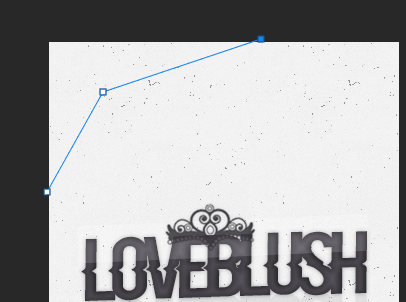
Connect the dots

2. Right click inside the area. Click "Make Selection" and then OK

Decide if you want it to be a gradient type of deco, or something else. I've decided on a gradient type of deco, so I clicked "Layer >> New Fill Layer >> Gradient" and chose my gradient.
3. Time to do the strokes. Hold in CTRL on your keyboard and click the thumbnail of the layer. Click "Select >> Modify >> Expand >> expand it by 2". Click "Layer >> New Fill Layer >> Solid Color >> OK" and choose the color white. Drag the white layer under the gradient layer.

4. Add a 1px scanline stroke to the white layer. Add a dropshadow if you want. Mine's "Opacity: 30%, Distance: 0, Spread 0px, and Size 5px"
Add the rest of the stuff you want. If you don't really know what to do than check out my bg psd tutorial >> {CLICK HERE} <<.
When you're finished, save it as a PSD.
Finished Product: