
 This website is here to provide you with the
necessities to


 ✿ Owner: Kayla
preppy text v22
You'll be making something like:
The Steps
1. Ok so to save time, download this text psd -> {CLICK HERE}2. Color your text and choose a font, but make every other letter a white color. I used color #f1f1f1 for the white. So for this tutorial I'm gonna show the text on a sign cause it's just easier with the white.

3. Duplicate the layer twice. On the 2nd layer, use the move tool to move it to the right 1-2 times and down 1-2 times. Hide ALL the effects that are already on it (like inner shadow) from my PSD. Add a color overlay.

Add glitter by clicking "Filter >> Noise >> Add Noise" >> rasterize it! >> match your settings to mine.

I have this now:

4. On the third layer, move it to the right a few times and down a few times. Don't move it too far or it'll look like crap. Add a color overlay again. This time don't add glitter!

5. You should have 3 text layers now. Create 3 new layers. Merge 1 new layer with each text layer. See how my text layers look clean now?

(If you want to add a blur behind the text than duplicate the top layer and drag it to the bottom. Then ignore it for now)
Now merge all 3 text layers together. Add a 2px gradient stroke.

I have this now:
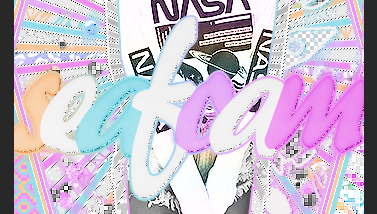
6. Ok so I forgot to tell you I put a blur behind my text lmao oops. Soo to do that click on that bottom text layer I told you to ignore earlier. Click Click "Filter >> Blur >> Radial blur" and match your settings to mine and click ok. There should be a colorful blur behind the text now!

7. Now I added reflecting text below my text.
CLICK HERE if you don't know how to reflect text.

8. Then I added a pattern behind the text.
CLICK HERE if you don't know to add a pattern behind text.
Finished Product: